Seedfire connects your people to the servers, firewalls, cameras and desktops behind NAT — across every site — with zero public ports. Certificate SSH and one-click RDP, a self-service portal for your users, and a control plane that runs on a box you own.
Operators manage the fleet in the console. Users sign up, install the app and connect from the portal. Devices dial out with one command. Everything meets on your server.
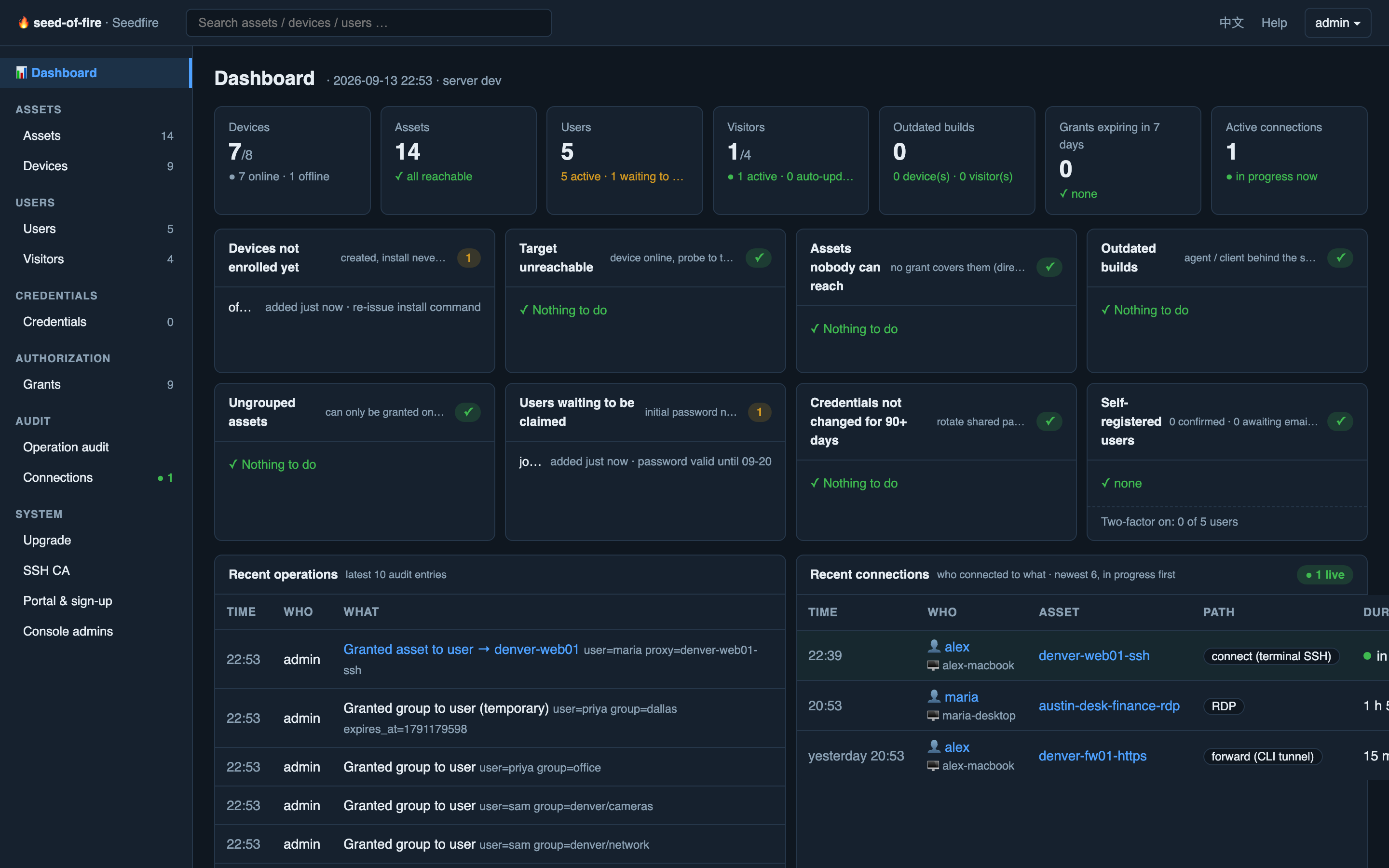
Everything in one shell: assets, devices, users, credentials, permissions, audit and upgrades — one page per object, nothing buried.
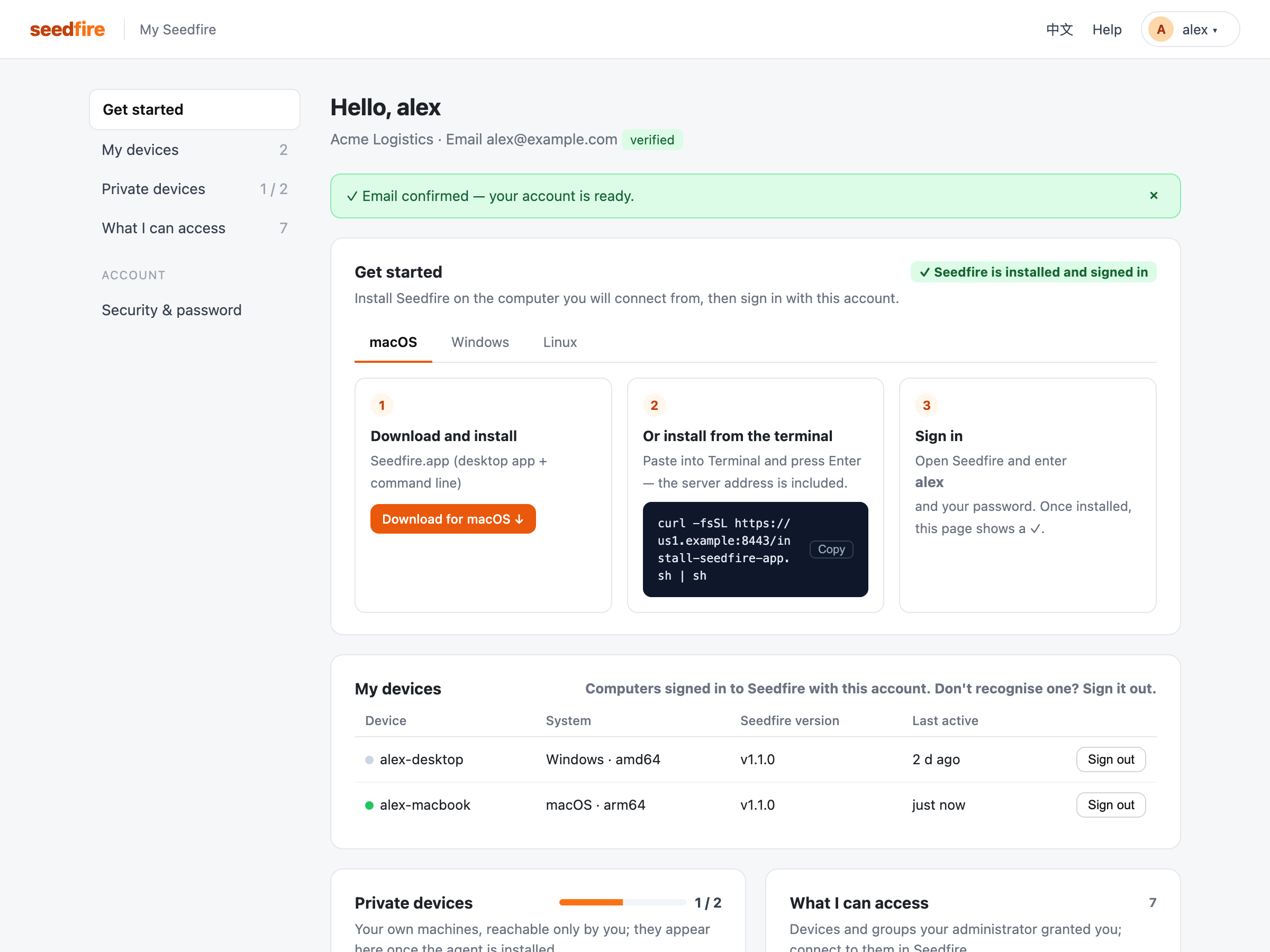
A self-service home at my.seedfire.org: sign up, install, see what you can access — without filing a ticket.
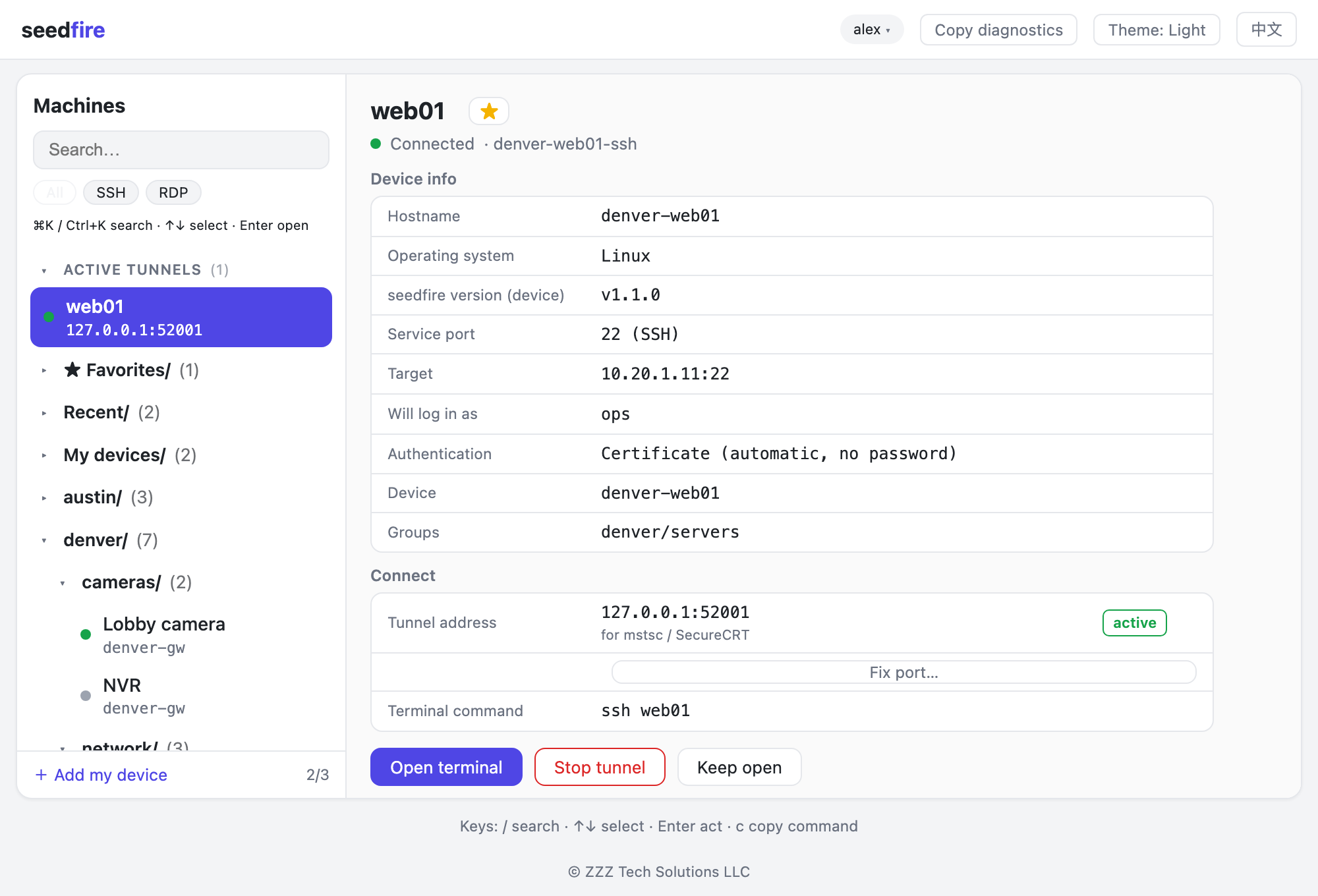
One install gives you both: a tray app for clicking and a bastion-style menu for typing. They update together and never drift apart.
Not a demo lab — mixed fleets of Linux boxes, Windows desktops, firewalls, UPSes, iDRACs and cameras across many sites.
Devices connect outbound over encrypted tunnels. Nothing on your sites listens on the internet — not even for us.
A short-lived SSH certificate is issued per connection — no keys to copy, instant revocation. Windows opens straight into Remote Desktop with stored credentials.
Organise thousands of assets as folders (denver/cams, denver/net). Grant a folder to a person or a team and see, per person, exactly what they can reach.
Every asset target is probed each minute. Debounced down/up alerts reach your webhook or Telegram — before your users notice.
Signed, checksum-verified upgrades roll out in batches with a preflight check, offline devices catch up when they return, and rollback is one click.
Who connected to what, when, from where and for how long — metadata only, never content. Every login, grant and upgrade is an audit row.
Stored passwords are sealed with a master key and delivered per connection — users log in without ever seeing them. Rotate once, everyone follows.
Enroll a machine with one line. Delete it in the console and the client uninstalls itself. Nothing to chase down later.
One Go binary, SQLite state, native systemd. Your own domain and logo if you want them. No third-party cloud in the path — the control plane is a box you own.
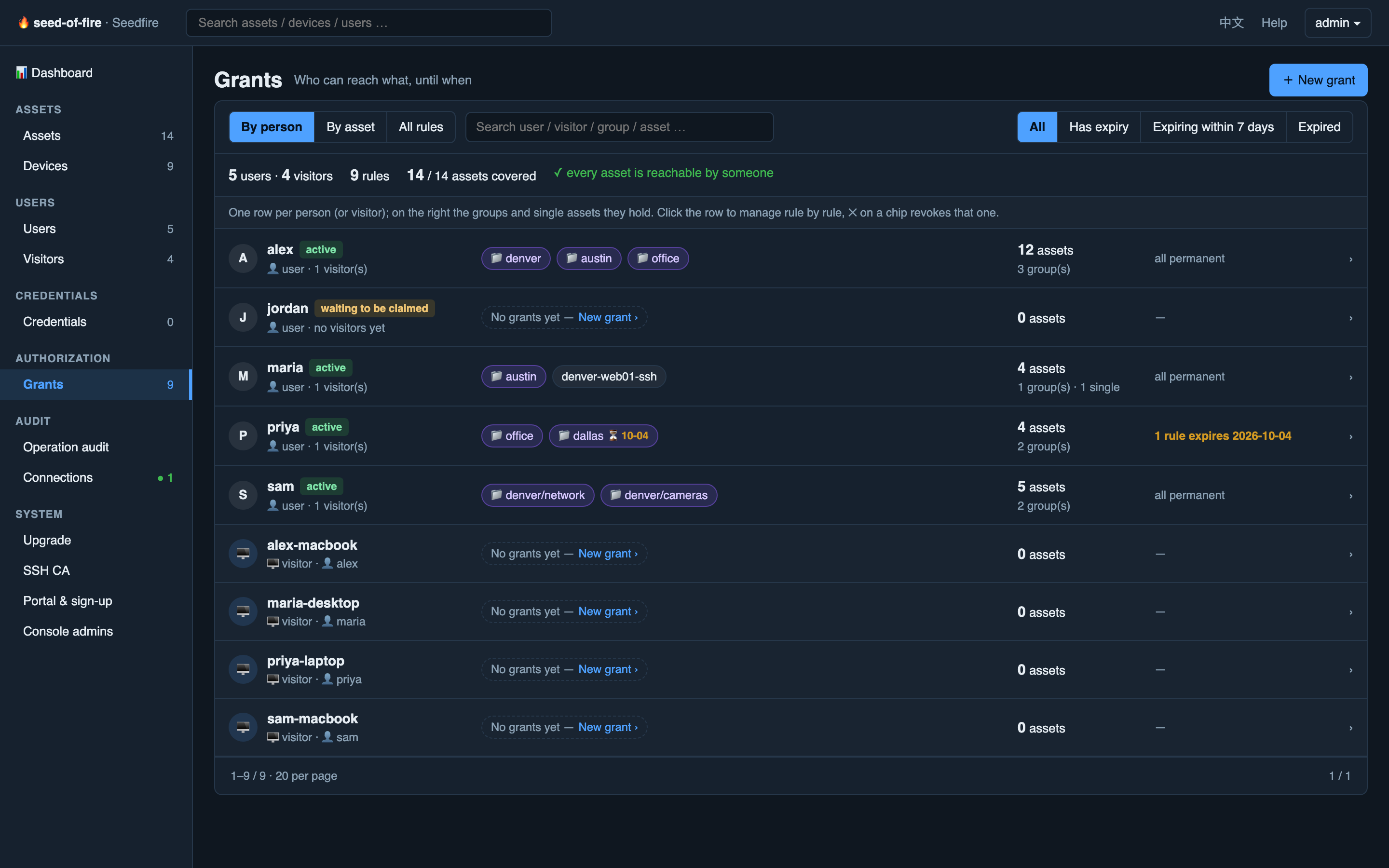
Grant a folder, a single asset, or both — permanently or until a date. The Grants page shows it the way you think about it: by person, with the groups they hold as chips and a running total of covered assets. Nothing hides in a rules table.
Three steps from nothing to certificate SSH — no network changes, no firewall tickets.
One binary on any Linux box: tunnel broker, API, CA, admin console and user portal — all in it. Bring a domain; TLS certificates issue themselves.
manager-server servePaste the one-liner from the console on the machine you want to reach. Have fifty? Paste the list, review, confirm.
curl -fsSL https://your-server:8443/install.sh | sudo -E bashUsers create an account at my.seedfire.org, install the app, and reach whatever they're granted — by click, name or menu.
$ seedfire connect web01
web01 $ _Most access tools bolt security on. Seedfire's defaults are the security model.
Devices and users both dial out to your server. No listening ports on any site, no exposed RDP, no VPN concentrator to patch.
SSH certificates live minutes and are minted per connection. Enrollment links and initial passwords expire. Leaving means access is gone — not "remember to rotate".
Two-factor authentication with recovery codes, browser-based sign-in with an 8-character anti-phishing code, and social logins that can only attach to an account after you prove the password.
Stored secrets are encrypted with a master key you hold and are never displayed — not in the console, not in exports, not in logs.
Connection records capture who, when, where and how long — and say plainly that content is not recorded. Every administrative action is audited.
Agents and apps update only to builds signed by your server and checked by hash. Decommissioned clients remove themselves instead of lingering.
A VPN gets you a network. Seedfire gets you the machine — with identity, audit and control.
| Seedfire | Traditional VPN | |
|---|---|---|
| Public attack surface | none — everything dials out | VPN port exposed to the internet |
| Access granularity | per asset, per person, per group | whole subnets once you're in |
| SSH & RDP logins | short-lived certificates, stored credentials never shown | keys and passwords to manage |
| Onboarding a user | self-service portal, Google/GitHub sign-in, 2FA | config files and a helpdesk ticket |
| Audit trail | every connection, grant and upgrade | connection logs at best |
| Fleet software upgrades | built in, batched, verified, reversible | not its job |
Create an account at my.seedfire.org, install Seedfire on your computer and sign in. The "What I can access" list shows everything your administrator has granted you. Need more? Ask your administrator — access is granted per person or per group in the console.
Creating an account, installing the app and enrolling your own private devices is free. If you run a fleet or want your own Seedfire server for your organisation, get in touch — we'll set you up.
A machine you enroll yourself — a home NAS, a lab box, your desk PC — that only you can reach. It appears under "Mine" in the app and is invisible to everyone else, including administrators' asset lists.
The desktop app and CLI run on macOS and Windows; the CLI also runs on Linux. Device agents run on Linux, Windows and macOS, x86-64 and ARM64. Anything with an IP — firewalls, cameras, UPSes, iDRACs — can be reached through an agent on the same network.
Use one of the recovery codes you saved when you turned on two-factor authentication. If you have none left, your administrator can reset 2FA for your account from the console.
No. Traffic flows through your organisation's own Seedfire server, end-to-end encrypted between your computer and the device. Connection records store only metadata — who, when, which device, how long — never content.
Still stuck? Contact us — we reply by email, usually within a day.
Seedfire runs real multi-site fleets today. Start with your own devices, or talk to us about yours.